Your First React App
Now that your development environment is set up, let's try to modify the default app to display "Hello, World!".
Modify the React App
Look in the my-react-app directory, and you will find a
src folder. Inside the
src folder there is a file called
App.jsx, open it and it will look like this:
Example
This is the default content of the App.jsx file in the src folder:
import { useState } from 'react'
import reactLogo from './assets/react.svg'
import viteLogo from './assets/vite.svg'
import heroImg from './assets/hero.png'
import './App.css'

function App() {
  const [count, setCount] = useState(0)

  return (
    <>
      <section id="center">
        <div className="hero">
          <img src={heroImg} className="base" width="170" height="179" alt="" />
          <img src={reactLogo} className="framework" alt="React logo" />
          <img src={viteLogo} className="vite" alt="Vite logo" />
        </div>
        <div>
          <h1>Get started</h1>
          <p>
            Edit <code>src/App.jsx</code> and save to test <code>HMR</code>
          </p>
        </div>
        <button
          type="button"
          className="counter"
          onClick={() => setCount((count) => count + 1)}
        >
          Count is {count}
        </button>
      </section>

      <div className="ticks"></div>

      <section id="next-steps">
        <div id="docs">
          <svg className="icon" role="presentation" aria-hidden="true">
            <use href="/icons.svg#documentation-icon"></use>
          </svg>
          <h2>Documentation</h2>
          <p>Your questions, answered</p>
          <ul>
            <li>
              <a href="https://vite.dev/" target="_blank">
                <img className="logo" src={viteLogo} alt="" />
                Explore Vite
              </a>
            </li>
            <li>
              <a href="https://react.dev/" target="_blank">
                <img className="button-icon" src={reactLogo} alt="" />
                Learn more
              </a>
            </li>
          </ul>
        </div>
        <div id="social">
          <svg className="icon" role="presentation" aria-hidden="true">
            <use href="/icons.svg#social-icon"></use>
          </svg>
          <h2>Connect with us</h2>
          <p>Join the Vite community</p>
          <ul>
            <li>
              <a href="https://github.com/vitejs/vite" target="_blank">
                <svg
                  className="button-icon"
                  role="presentation"
                  aria-hidden="true"
                >
                  <use href="/icons.svg#github-icon"></use>
                </svg>
                GitHub
              </a>
            </li>
            <li>
              <a href="https://chat.vite.dev/" target="_blank">
                <svg
                  className="button-icon"
                  role="presentation"
                  aria-hidden="true"
                >
                  <use href="/icons.svg#discord-icon"></use>
                </svg>
                Discord
              </a>
            </li>
            <li>
              <a href="https://x.com/vite_js" target="_blank">
                <svg
                  className="button-icon"
                  role="presentation"
                  aria-hidden="true"
                >
                  <use href="/icons.svg#x-icon"></use>
                </svg>
                X.com
              </a>
            </li>
            <li>
              <a href="https://bsky.app/profile/vite.dev" target="_blank">
                <svg
                  className="button-icon"
                  role="presentation"
                  aria-hidden="true"
                >
                  <use href="/icons.svg#bluesky-icon"></use>
                </svg>
                Bluesky
              </a>
            </li>
          </ul>
        </div>
      </section>

      <div className="ticks"></div>
      <section id="spacer"></section>
    </>
  )
}

export default App
Try replacing the entire file content with the code below and save the file.
Example
Replace all the content of the App.jsx file with the code below:
function App() {
  return (
    <div className="App">
      <h1>Hello World!</h1>
    </div>
  );
}

export default App;
See the changes in the browser when you click Save.
Notice that the changes are visible immediately after you save the file, you do not have to reload the browser!
The result:
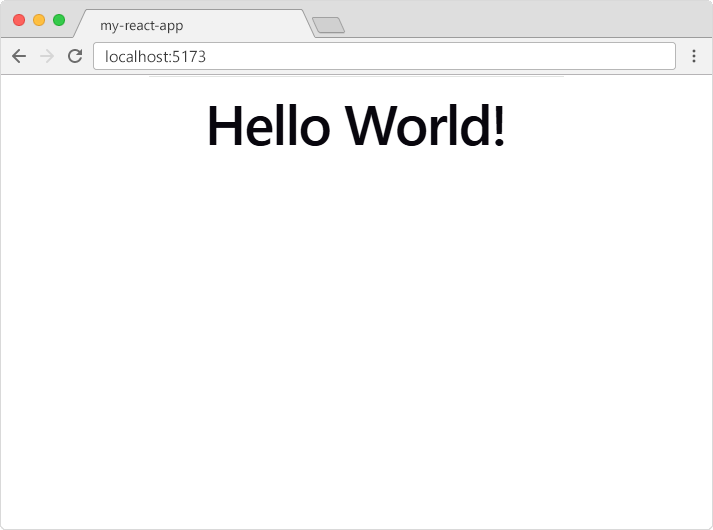
Congratulations! You've just modified your first React application.

